1 Put the client on a share
- Create a network share. With several sites, create a share per site, or use one share for all of them.
- Give all users read and execute permission on the share.
- Copy the contents of
<SoftwareCentral install folder>\Tools\CmRcViewer\to the share. - Enter the UNC path to
CmRcViewer.exeon the share under Settings › SCCM › Shares › Remote Control Tool Share Path, for each site.
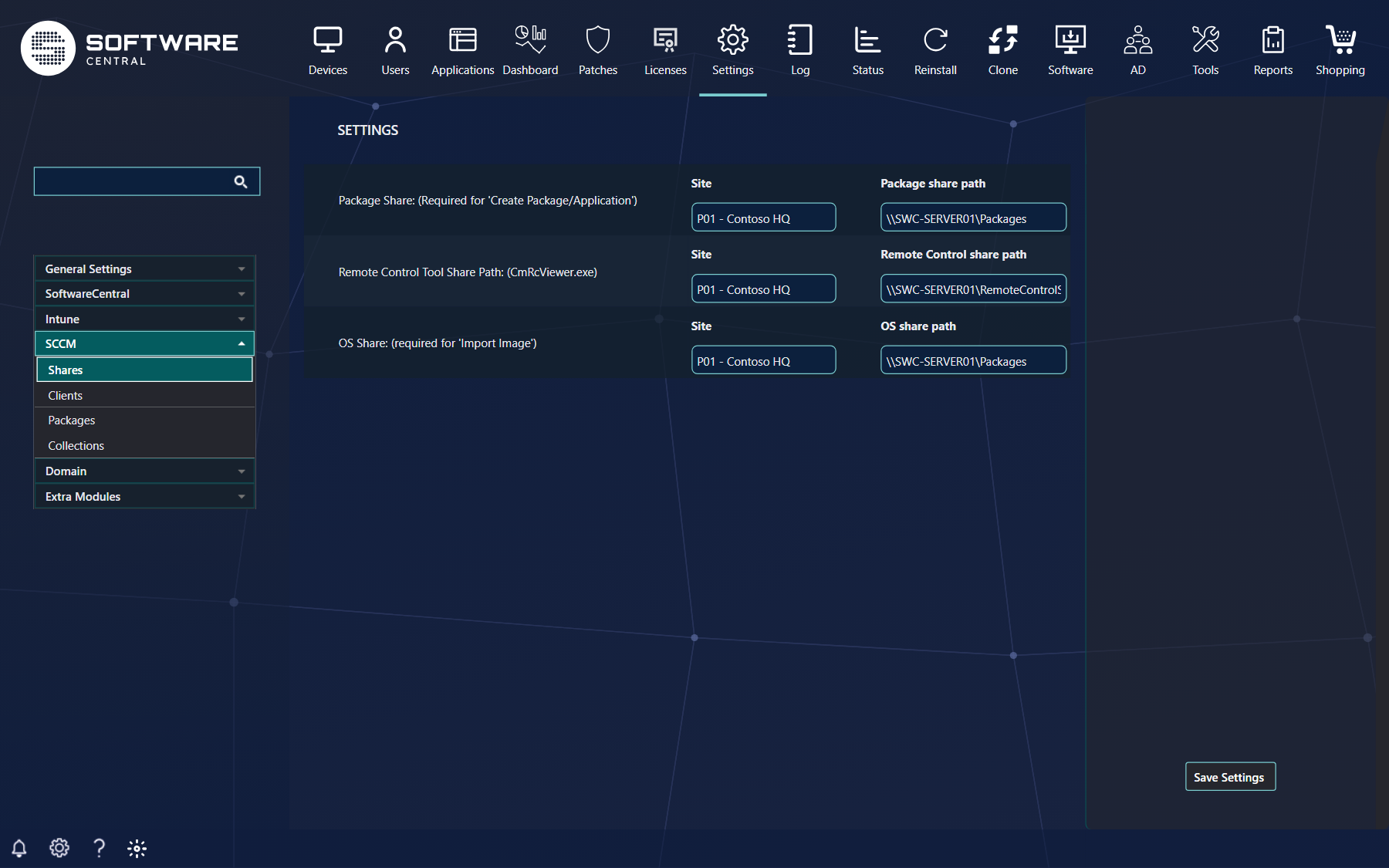
That is all the Remote Control Tool and your custom tools need. The rest of this page is for the shop, and for environments where the automatic registration cannot reach the devices.
C:\SoftwareCentral\SoftwareCentralClient.exe.
2 Update the client
New versions of the client are announced in the SoftwareCentral release notes. Copy the new
SoftwareCentralClient.exe from the Tools folder to your share, replacing the old one, or
deploy it to the local folder.
To see which version you have, right-click the file, choose Properties and open the Details tab:

3 Automatic registration
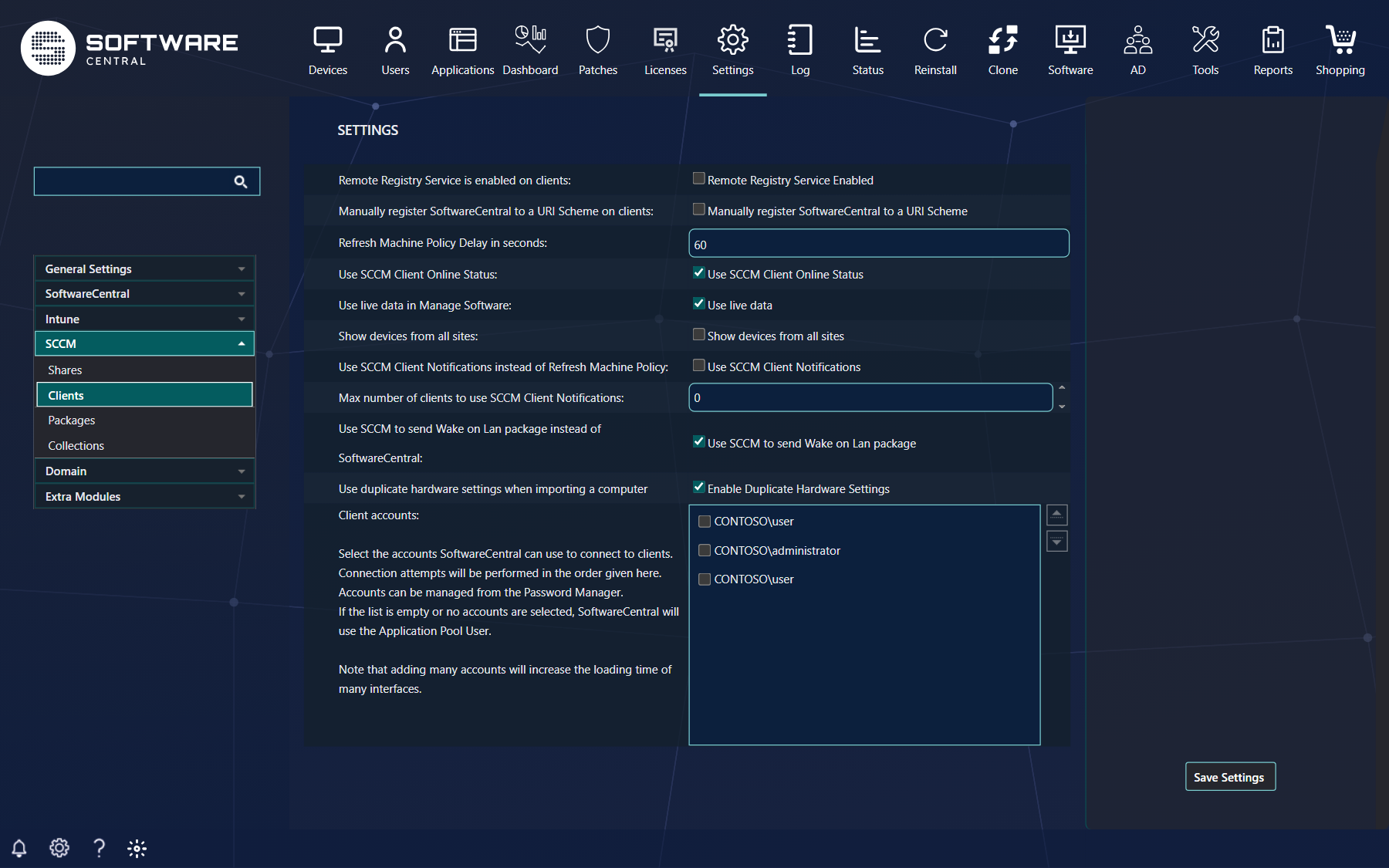
For the Remote Control Tool and custom tools, SoftwareCentral registers the client on the administrator's computer by itself the first time it is needed, using WMI. The settings are under Settings › SCCM › Clients:
| Setting | What it does |
|---|---|
| Remote Registry Service Enabled | Tick it if the Remote Registry service runs on all your clients: SoftwareCentral then registers through it instead of WMI, which is faster. |
| Manually register SoftwareCentral to a URI Scheme | SoftwareCentral no longer tries to register the client; you do it yourself on every device. Always on when SoftwareCentral only manages Intune devices. |
4 Manual registration
Register the client yourself when the shop uses it, when the automatic registration cannot reach the devices, or when there are DNS problems or users connect over VPN.
The registration is a set of registry keys. Add them with a startup script, a script deployed by Configuration Manager or Intune, or a Group Policy. These keys are required:
| Key | Value name | Value (REG_SZ) |
|---|---|---|
HKEY_CLASSES_ROOT\SoftwareCentral | (Default) | URL:SoftwareCentral Protocol |
HKEY_CLASSES_ROOT\SoftwareCentral | URL Protocol | (empty) |
HKEY_CLASSES_ROOT\SoftwareCentral\shell\open\command | (Default) | "\\ServerName\ShareName\CmRcViewer\SoftwareCentralClient.exe" "%1" |

HKEY_CLASSES_ROOT\SoftwareCentral.
...\shell\open\command.For Internet Explorer, you can also stop its security question with a key for every user, or for the current user in a Group Policy. For the other browsers, see Removing the browser question.
| Key | Value name | Value (DWORD) |
|---|---|---|
HKEY_USERS\[UserSID]\SOFTWARE\Microsoft\Internet Explorer\ProtocolExecute\SoftwareCentral | WarnOnOpen | 0 |

5 Scripts
Two scripts set the keys for you. Both need administrative permissions, because they change the registry. Run them on the devices where the automatic registration fails, or switch the automatic registration off and run them on all devices.
The VBScript that comes with SoftwareCentral
<SoftwareCentral install folder>\Tools\RegisterClientToUriScheme.vbs. To run it by hand or as a
startup script, change the value strSharePath on line 32 to your own share. As a package, give the
share path as argument instead (section 6). /u removes the registration again.
PowerShell
Set the path to the client on the first line. The last lines also remove the browser question in Edge and Chrome.
$pathToClient = "\\ServerName\RemoteToolShare$\CmRcViewer\SoftwareCentralClient.exe"

# Add the client to the URI scheme
$registryPath = "HKLM:\SOFTWARE\Classes\SoftwareCentral"
New-Item -Path "$registryPath\shell\open\command" -Force | Out-Null
New-ItemProperty -Path $registryPath -Name "(Default)" -Value "URL:SoftwareCentral Protocol" -PropertyType String -Force | Out-Null
New-ItemProperty -Path $registryPath -Name "URL Protocol" -Value "" -PropertyType String -Force | Out-Null
New-ItemProperty -Path "$registryPath\shell\open\command" -Name "(Default)" -Value """$pathToClient"" ""%1""" -PropertyType String -Force | Out-Null

# Remove the question in Microsoft Edge
New-Item -Path "HKLM:\SOFTWARE\Policies\Microsoft\Edge\URLAllowlist" -Force | Out-Null
New-ItemProperty -Path "HKLM:\SOFTWARE\Policies\Microsoft\Edge\URLAllowlist" -Name "1" -Value "SoftwareCentral://*" -PropertyType String -Force | Out-Null

# Remove the question in Google Chrome 102 and later (Chrome 77-101: use URLWhitelist instead of URLAllowlist)
New-Item -Path "HKLM:\SOFTWARE\Policies\Google\Chrome\URLAllowlist" -Force | Out-Null
New-ItemProperty -Path "HKLM:\SOFTWARE\Policies\Google\Chrome\URLAllowlist" -Name "1" -Value "SoftwareCentral://*" -PropertyType String -Force | Out-Null
If the allow lists already have an entry named 1, use the next free number.
6 Deploy the registration
| How | What to do |
|---|---|
| A package or application |
Install program: cscript.exe "RegisterClientToUriScheme.vbs" "/\\ServerName\Share$\"Uninstall program: cscript.exe "RegisterClientToUriScheme.vbs" /u |
| A detection rule | For an application, add a registry detection rule that looks for the key HKEY_CLASSES_ROOT\SoftwareCentral. |
| A Group Policy | Set the keys from section 4 with Group Policy Preferences › Registry. |
| Intune | Deploy the PowerShell script as a platform script, with the client in a local folder. |


7 The browser question
When the client starts, the browser may ask the user first — sometimes so briefly that they have no time to
answer. Add the SoftwareCentral: link to each browser's allow list to remove the question; see
Removing the browser question.
8 Best practice
- Use the supplied script for the registration. It sets the browser prompt for SoftwareCentral to off (WarnOnOpen is 0).
- Use manual registration when SoftwareCentral should not register the client itself. The setting's tooltip says it is used by the Remote Control Tool and Custom Tools.
9 Troubleshooting
| Symptom | Cause | What to do |
|---|---|---|
| The Remote Control Tool or a custom tool does not start, and the log holds “Failed to register the SoftwareCentral Client to the URI Scheme on client…” | Automatic registration failed on that computer. | Register the client on that computer by hand, see Manual registration or Scripts. |
| “Failed to register protocol… to the URI Scheme on client…” in the log. | Automatic registration failed on that computer. | Register the client on that computer by hand, see Manual registration or Scripts. |
| The browser asks whether to open SoftwareCentral every time. | The WarnOnOpen value is 1, or the Edge or Chrome allow list does not include SoftwareCentral. | Set WarnOnOpen to 0 as described in Manual registration, and add the allow list entries from Scripts. See also Removing the browser question. |