1 Which account to grant
The database account is chosen in the Database connection step of the first-time setup. Grant the rights in this guide to that account.
| Option | What it means |
|---|---|
| Trusted Connection (ticked by default) | SoftwareCentral connects with Windows authentication, as the account the web application's application pool runs as. No password is stored. Grant the rights to that Windows account. |
| Trusted Connection not ticked | SoftwareCentral connects with a SQL login. Enter it in SQL User and SQL Password; the password is stored encrypted. Grant the rights to that SQL login. |
The earlier guide used one login
The earlier version of this guide grants these rights to the SCCM_SWC_ADMIN login. You can use that login, or any other account, as long as you enter the same account in Database connection and give it the rights below.
2 Open the login
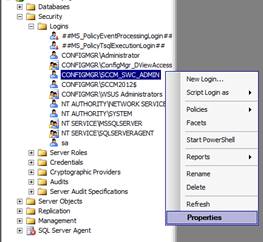
In SQL Server Management Studio, open Security › Logins, right-click the login, and choose Properties.
3 Map the database roles
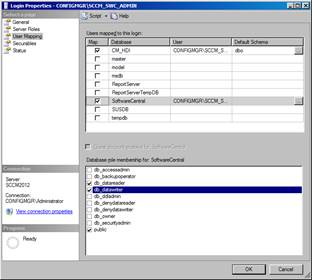
Choose User Mapping, map the SoftwareCentral database, and grant db_datareader and db_datawriter on it.
4 Grant Execute
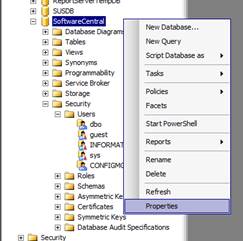
Locate the SoftwareCentral database in the Databases folder, right-click it, and choose Properties.
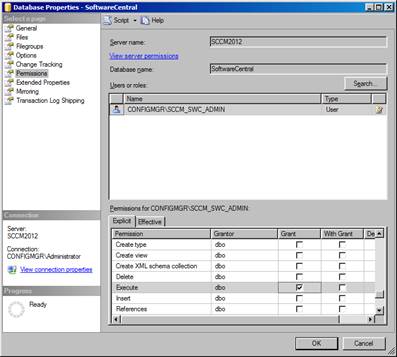
Choose Permissions, select the login, and grant Execute on the SoftwareCentral database. Click OK.
5 Best practice
- Use a dedicated account, not a personal one, so that SoftwareCentral keeps working when staff change.
- Prefer a trusted connection when the web server and the database are in the same Windows domain. SoftwareCentral then stores no password for the database.
- Give only the rights listed here. SoftwareCentral needs to read and write its own data, so both db_datareader and db_datawriter are needed. Do not give database owner rights, except for the migration described in Troubleshooting.
- Test the connection after any change. If you change the account or its password, press Test Connection in Database connection before you go on.
6 Troubleshooting
| Symptom | Cause | What to do |
|---|---|---|
| "App pool user doesn't have alter permission on the SoftwareCentral database, the migration job can't be executed." | A database migration needs the ALTER permission, which the application pool user does not have. | Make the application pool user the database owner (db_owner) for the migration. Run the migration job again, then remove that role again when the job has finished. |
| SoftwareCentral cannot read or save its data after the rights were set. | The login is not mapped to the SoftwareCentral database, or one of db_datareader and db_datawriter is missing. | Check the mapping and both roles in steps 2 and 3, then press Test Connection in Database connection. |