1 Create the folder
Create a folder called SoftwareCentral in the root of your website. The usual location is %SystemDrive%\Inetpub\SoftwareCentral.
2 Add the web site in IIS Manager
| Step | What to do |
|---|---|
| 1 | Start Internet Information Services (IIS) Manager. |
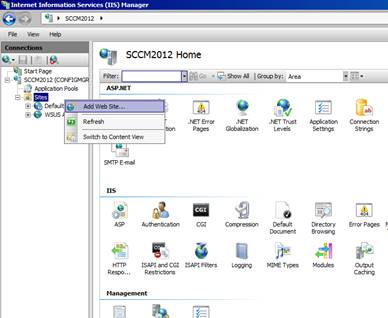
| 2 | Expand the tree to Sites, right-click Sites and select Add Web Site… from the context menu. |
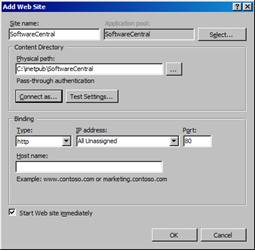
| 3 | Set Site name to SoftwareCentral, and use the … button next to Physical path to browse to the folder you created in step 1. |
Important
Don't forget to create a host record for SWC in the corporate DNS. Host records may not contain underscores (
_), because of restrictions in Internet Explorer.
3 Create the DNS host record
Create a host record for SWC in the corporate DNS, for example swc.contoso.com, that points to the web server. Do this before users, or the other web sites in this setup, use the name.
4 Best practice
- Create the DNS record before you enter a host name. A host name in IIS only helps users when the name resolves to the web server. Host names must not contain underscores.
- Plan for HTTPS. The Settings page says that the anonymous site should use HTTPS when self-service password reset is used, so decide on the certificate before you publish the names.
- Expect Anonymous Authentication to be on. A new IIS site starts with Anonymous Authentication enabled. Set the authentication (see Set the Authentication for the SoftwareCentral website) before you give users the address.