1 The two rules
Your structure can differ from the default one, if it follows both rules:
| Rule | What it means |
|---|---|
| 1 | Any application or package may only be deployed to one unique collection per action. |
| 2 | Any application or package must be deployed to an install device collection. |
2 Collections SoftwareCentral reads
Within these rules, an application or a package can be deployed to these collections, and no others.
| Item | Collections |
|---|---|
| Application |
One install device collection (required) One uninstall device collection (optional) One install user collection (optional) One uninstall user collection (optional) |
| Package |
One install device collection (required) One uninstall device collection (optional) |
3 Keep a custom structure outside
If your structure does not follow the rules, keep it apart from SoftwareCentral's folders.
If your collection structure does not follow the rule above, you can create a SoftwareCentral structure and a custom structure, where the custom structure will be ignored by SoftwareCentral.
The SoftwareCentral structure is defined by the root folders. These are the three folders created by Create default structure (Software Distribution for devices, Software Distribution for users and Software Distribution Packages), and the folders and collections you select as the root folders in the settings. See SCCM Folders and Collections.
You can then create your custom structure outside the root folders that belong to SoftwareCentral.
SoftwareCentral can automatically generate its own structure if needed. See the guide Mend Packages and Applications for more information on how to generate your collection structure.
4 Limitations
You may also find that the following functionalities are limited:
- Scheduled deployments
- Uninstallations
- License harvesting
5 Example
A customer with an existing Configuration Manager environment installs SoftwareCentral.
The existing environment is built up as shown in Figure 13. The folder structure is deeper than the one SoftwareCentral uses. This does not matter to SoftwareCentral, as folders are only visual aids.
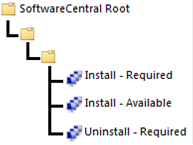
In the final folder, there are 3 collections instead of the 2 collections allowed by SoftwareCentral.
The application is deployed to 2 collections with an install action. So if a user tries to deploy the application, SoftwareCentral will be unable to determine which install collection is to be used.
To solve this, the customer has to move the install collection SoftwareCentral is not supposed to use, outside of the root folder belonging to SoftwareCentral and place it in its own custom structure, see Figure 14 below.
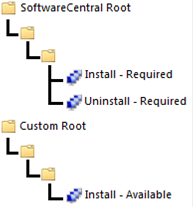
The structure in Figure 14 can be read by SoftwareCentral. But application and package creation will not function properly in it.
6 Best practice
- Keep one install device collection per application or package in the SoftwareCentral root folders. Move any other install collection outside them, as in the example, so SoftwareCentral does not have to choose between them.
- Put your own structure outside the SoftwareCentral root folders. SoftwareCentral ignores it, so it can stay as it is.
- Do not edit or delete packages and applications in SoftwareCentral unless you use the default structure, as described in section 4.
- Check the limitations before you rely on them. Scheduled deployments, uninstallations and license harvesting are limited with a custom structure.
- Compare with the default structure in Default Collection Structure before you decide to keep your own layout.