1 What the delegation is for
The Active Directory module does not need this step as such. It is needed so that SoftwareCentral can delete computer objects in Active Directory.
The same account also uses the rights for the other computer actions in the Active Directory pages: creating a computer account, moving it to another OU, changing its description, notes and manager, and enabling or disabling it.

2 Which account to delegate to
Give the delegation to the account that SoftwareCentral uses to sign in to Active Directory, not to a person's own account.
| Situation | Account to delegate to |
|---|---|
| The server's own domain, and any other domain where the server's domain and that domain are both Trusted | The application pool account, set under Settings › General Settings › Server Configuration in Application Pool Username. |
| Any other domain where the server's domain or that domain is not Trusted | The Service Account in that domain's row under Settings › Domain › Domains. |
In the steps below, the SoftwareCentral service account means this account, written as for example
CONTOSO\svc-swc. The SoftwareCentral Windows service is installed under the application pool account
in the same way, so the delegation covers it too.
3 Delegate Full Control of computer objects
Do these steps in Active Directory Users and Computers, once for each domain. The values in the pictures are examples, and the domain and account names are masked.
| Step | What you do | Screen |
|---|---|---|
| 1 | Open Active Directory Users and Computers. | |
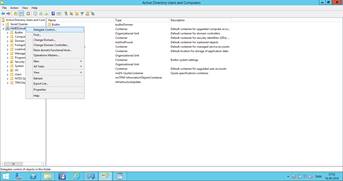
| 2 | Right-click the domain, then select Delegate Control…. |
|
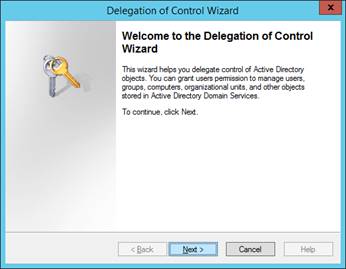
| 3 | Click Next. |
|
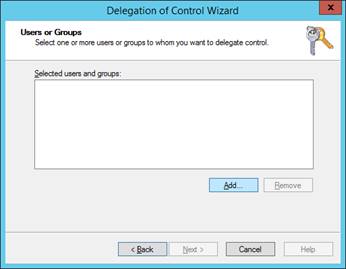
| 4 | Click Add. |
|
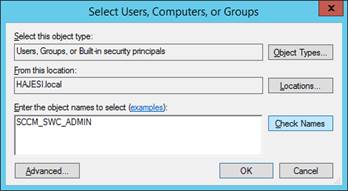
| 5 | Enter the SoftwareCentral service account in Enter the object names to select, then click Check Names. |
|
| 6 | Click OK. |
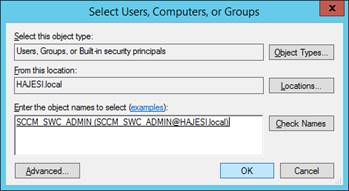
|
| 7 | Click Next. |
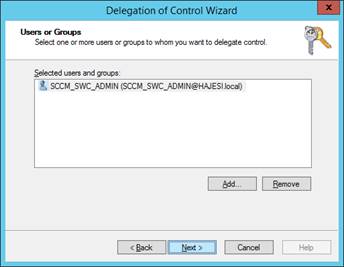
|
| 8 | Select Create a custom task to delegate, then click Next. |
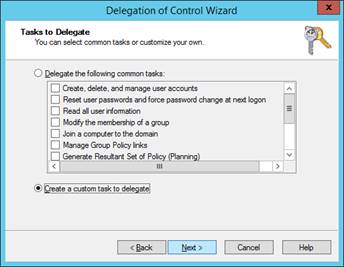
|
| 9 | Select Only the following objects in the folder. Tick Computer objects, then tick Create selected objects in this folder and Delete selected objects in this folder. Click Next. |
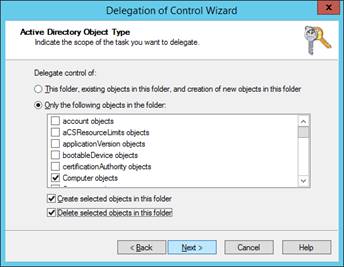
|
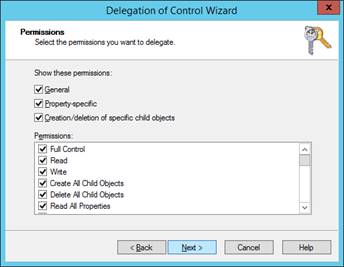
| 10 | Select Full Control, then click Next. |
|
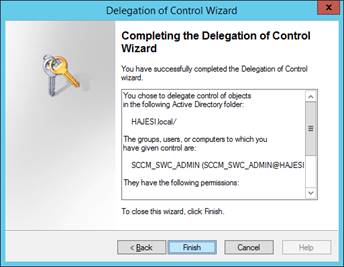
| 11 | Click Finish. |
|
4 The Delete in Active Directory settings
Two settings change how the Delete in Active Directory checkbox behaves in every delete window. Find them under Settings › SoftwareCentral › Interface Settings.
| Setting | What it does |
|---|---|
| Hide 'Delete in AD'-checkbox in the 'Delete Computer'-interfaces | Ticked, the checkbox is hidden and SoftwareCentral does not delete computer objects in Active Directory at all, from the delete windows or from Reinstall Single Computer. The name says hide, but the setting switches the AD delete off. |
| Lock the 'Delete in AD'-checkbox in the 'Delete Computer'-interfaces so it is always checked | Ticked, the checkbox is always ticked and cannot be changed, so every delete also deletes the computer object in Active Directory. If both settings are ticked, Hide wins and nothing is deleted in Active Directory. |
5 Best practice
- Delegate to the account SoftwareCentral actually uses. The rights on any other account have no effect on SoftwareCentral's directory calls, and the delete then fails with the message in the troubleshooting table. See which account to delegate to.
- Narrow the scope where you can. Delegating on the domain gives Full Control over every computer in it. If SoftwareCentral manages only some OUs, delegate on those OUs instead. Include every OU that SoftwareCentral creates computers in or moves them to, because the OU is chosen for each action.
- Decide the AD delete policy before you roll out. If SoftwareCentral must never delete computers in Active Directory, tick Hide 'Delete in AD'. Use Lock only when every delete should also remove the computer object.
- Check the Log after the first delete. A successful AD delete writes
Computer '…' deleted in Active Directory from domain '…'to the Log. If the line does not appear, the computer object was not deleted. - Update the delegation when the application pool account changes. The Windows service is installed under the same account, so delegate to the new account as well.
6 Troubleshooting
The messages are written to the Log. Find the entries for Active Directory there.
| Symptom | Cause | What to do |
|---|---|---|
Failed to delete computer from AD with computerDistinguishedName '…'. |
The account has no right to delete that computer object, or the object cannot be reached in its domain. | Check that the account in which account to delegate to has Full Control, or Delete selected objects, on Computer objects in the OU that holds the computer. |
ComputerName '…' is found 2 times in the Active Directory, computers will not be deleted in Active Directory |
The same computer name exists more than once in Active Directory, so SoftwareCentral does not guess which object to delete. | Remove the duplicate object by hand in Active Directory Users and Computers, then delete the computer again. |
ComputerName not found in Active Directory |
No computer object with this name exists in the domains that SoftwareCentral searches. | Nothing to do if the object is already gone. If it should be there, check the domain and its row under Settings › Domain › Domains. |
Failed to create computer '…' in the AD. |
The account cannot create computer objects in the OU that was chosen. | Add Create selected objects in this folder for Computer objects on that OU, as in step 9. |
Failed to move computer '…' to OU '…'. |
The account lacks rights on the computer object or on the destination OU. | Delegate Full Control on both OUs, or on the domain. |
Could not get directory entry at domain … |
SoftwareCentral cannot connect to that domain with the account that is set for it. | Check the Service Account, Password and Port Number of the domain under Settings › Domain › Domains, and that the server can reach the domain. |
| No Delete in Active Directory checkbox on Delete Single Computer | The setting Hide 'Delete in AD'-checkbox in the 'Delete Computer'-interfaces is ticked. | Untick it under Settings › SoftwareCentral › Interface Settings if SoftwareCentral should delete computers in Active Directory. |