1 Create the deployment
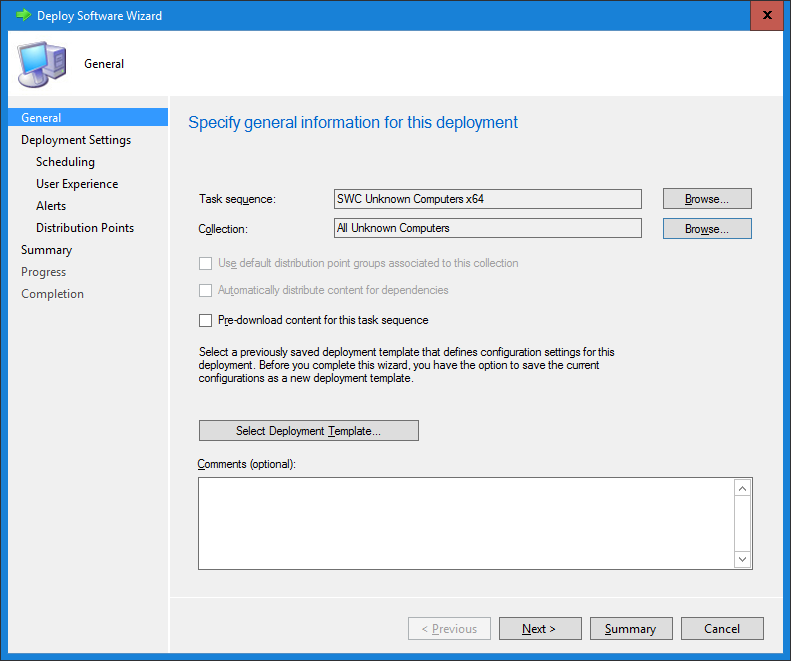
The last step is to create a deployment of the task sequence. Open the create deployment wizard.
- Select the Configuration Manager standard All Unknown Computers collection, as seen below.
- Press Next.
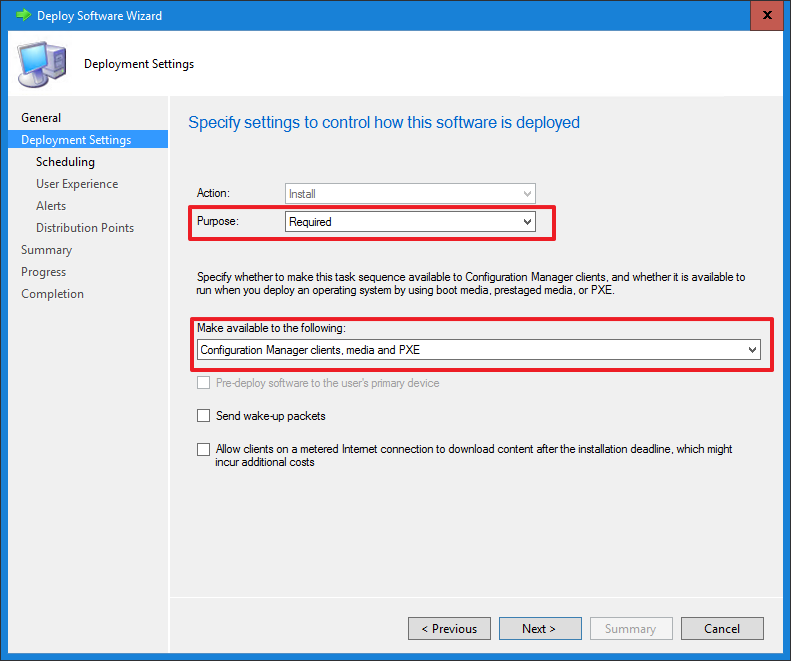
- In the Purpose setting, select Required.
- In the Make available to the following setting, select Configuration Manager clients, media and PXE.
- Press Next.
- Schedule the deployment to be available now, and assign the schedule to now.
- Leave all other settings as default.
2 What the HTA does
You are now ready to launch the HTA. When an unknown computer starts the deployment, the HTA opens in Windows PE. What it shows depends on whether SoftwareCentral already knows the computer.
| Computer | What the HTA does |
|---|---|
| Unknown computer | The MAC address (or the SMBIOS GUID) that the HTA reads from the computer is filled in and cannot be changed. Type the computer name and fill in the variables of the design. Press Import to add the computer to SoftwareCentral. |
| Known computer | The computer name is filled in and cannot be changed. The variables of the computer are filled in. If the design includes Keep Old Software, the checkbox is shown and ticked. |
| Known computer and Support Secure Boot is on | The HTA closes, unless HTA will always open is on. |
| Known computer that is already a member of an operating system deployment collection | The HTA closes, unless HTA will always open is on. A collection whose name contains "dummy" does not stop the HTA. |
The Import button is enabled only when the required fields are filled in: an operating system, a computer name, and a MAC address or SMBIOS GUID.
3 HTA will always open
To keep the HTA open for computers that are known or already in a task sequence, go to Settings › Extra Modules › Dynamic HTA and tick HTA will always open.
With this setting on, the HTA does not close for a computer that has Secure Boot support turned on or that is already a member of an operating system deployment collection.
4 Best practice
- Check the computer name before you import. If the name is already used by another computer in SoftwareCentral, the HTA warns you that this computer will be deleted when you proceed. Import only when the other computer should be removed.
- Turn on HTA will always open only when you need it. By default the HTA closes for a known computer that is already a member of an operating system deployment collection.
- Keep only one task sequence on the All Unknown Computers collection. The collection must start the HTA task sequence and nothing else.
- Use Windows authentication when the technician is signed in, so the templates and software groups offered follow the security role of the technician. The authentication setting belongs to the HTA design.
5 Troubleshooting
| Symptom | Cause | What to do |
|---|---|---|
| "Access denied by SoftwareCentral license" | The Dynamic HTA is not enabled for this SoftwareCentral installation, for example because its licence has expired. | Check the SoftwareCentral licence with your SoftwareCentral administrator. |
| "The computer name 'name' is already registered to another computer. If you proceed this computer will be deleted." | The computer name you typed belongs to another computer in SoftwareCentral. | Type a different name. Press Import only if the other computer should be deleted. |
| "The computer name doesn't follow the applied rule" | The name does not match the naming rule of the HTA design. | Type a name that follows the rule. |
| "The MAC address is a Hardware Identifier in SCCM and can't be used, enter a SMBIOS GUID or another MAC-address." | The MAC address is already used as a hardware identifier in Configuration Manager. | Enter the SMBIOS GUID, or another MAC address of the computer. |
| "Some mandatory variables are missing" | A mandatory field, marked with *, is empty. | Fill in every field that is marked with *. |
| The HTA closes when it opens. The log shows "The HTA will close." with the reason. | The computer is known and Secure Boot support is on, or it is already a member of an operating system deployment collection. The HTA does not show a message. | This is expected. If the HTA must open for this computer, turn on HTA will always open. |