1 Create the boot image
First create a new boot image, with the same drivers as the preexisting boot images. This image then needs the changes in the next sections.
Newer application
This page is for the SoftwareCentral HTA, which starts HTA_Dynamic.hta. For the Prestage Computer application, which starts PrestageComputer.exe, see Prestage Computer configuration.
2 Add the optional components
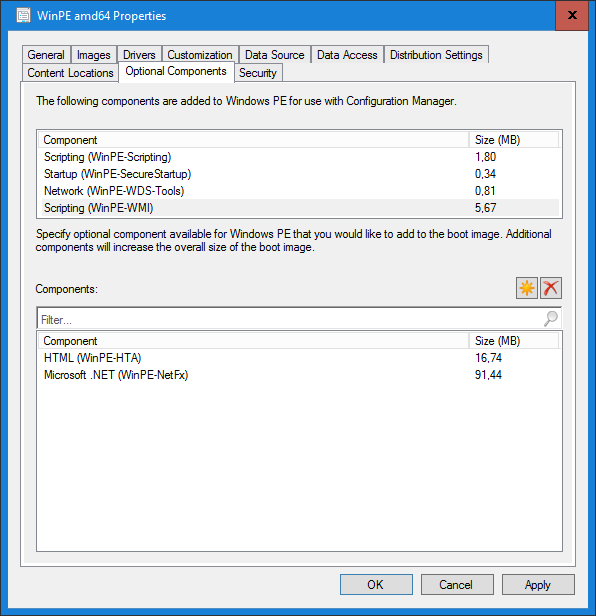
Go to the Optional Components tab, as seen below. Add the two following components by clicking the star button.
- Microsoft .NET (WinPE-NetFx)
- HTML (WinPE-HTA)
3 Set the prestart command
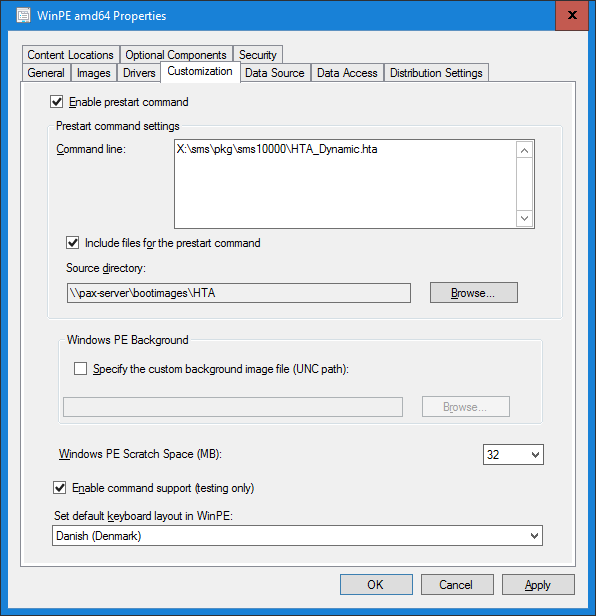
Go to the Customization tab, as seen below, and change the following settings.
- Check Enable prestart command.
- Add the following command line:
X:\sms\pkg\sms10000\HTA_Dynamic.htaIf the name of the .hta file has been changed, the command line also needs to be changed.
- Check Include files for the prestart command.
- Change the Source directory to the share where the HTA_Dynamic.hta file is.
- Check Enable command support. This is not mandatory.
| Where the file comes from | What to do |
|---|---|
| HTA_Dynamic.hta | Open the HTA administration page, Create HTA, as described in SoftwareCentral HTA, and click Download HTA script. The script is built from the settings on that page. Copy the file to the share in the Source directory. |
4 Set the Data Source tab
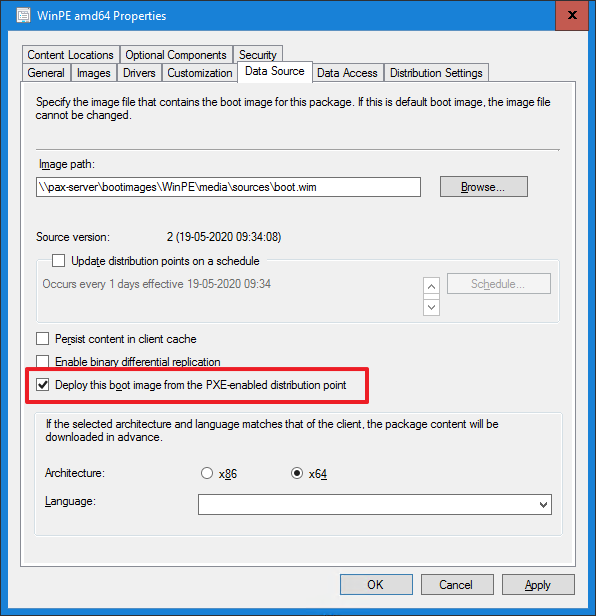
Go to the bottom of the Data Source tab and change the following setting, as seen below.
- Check Deploy this boot image from the PXE-enabled distribution point.
5 Distribute the image
Distribute the new image to the distribution point.
6 Best practice
- Download the HTA script again after every change to the HTA design, and copy it to the share. The script is rebuilt from the page's settings each time, including the window size, the MAC address and SMBIOS GUID settings and the SoftwareCentral address. A copy made earlier keeps the old design.
- Check the address in HTA_Dynamic.hta before you copy it. With Anonymous authentication, the script is written with the placeholder
http://SoftwareCentralAddressAnonymous. Change it to the address of your SoftwareCentral site, which the boot image must be able to reach. - Use Preview on the HTA administration page to check the design before you distribute the boot image.
- Distribute the boot image again after you copy a new HTA_Dynamic.hta to the share, so that the distribution points have the same files.
7 Troubleshooting
| Symptom | Cause | What to do |
|---|---|---|
| "Failed to create dynamic HTA script." (in the SoftwareCentral log, not on the screen) | SoftwareCentral could not create the HTA_Dynamic.hta copy when you saved or downloaded the design, so the file does not match the design. | Read the log entry for the details. Then download the script again. If it fails again, check that the SoftwareCentral web site can write to its Uploads\HTA folder. |