1 What it does
When AD-Deployment is on, SoftwareCentral adds resources to AD-Groups instead of collections.
This document describes how to configure and use this feature.
2 Turn it on
Go to the Settings interface, open Domain › Active Directory, and tick Use AD-Deployment.
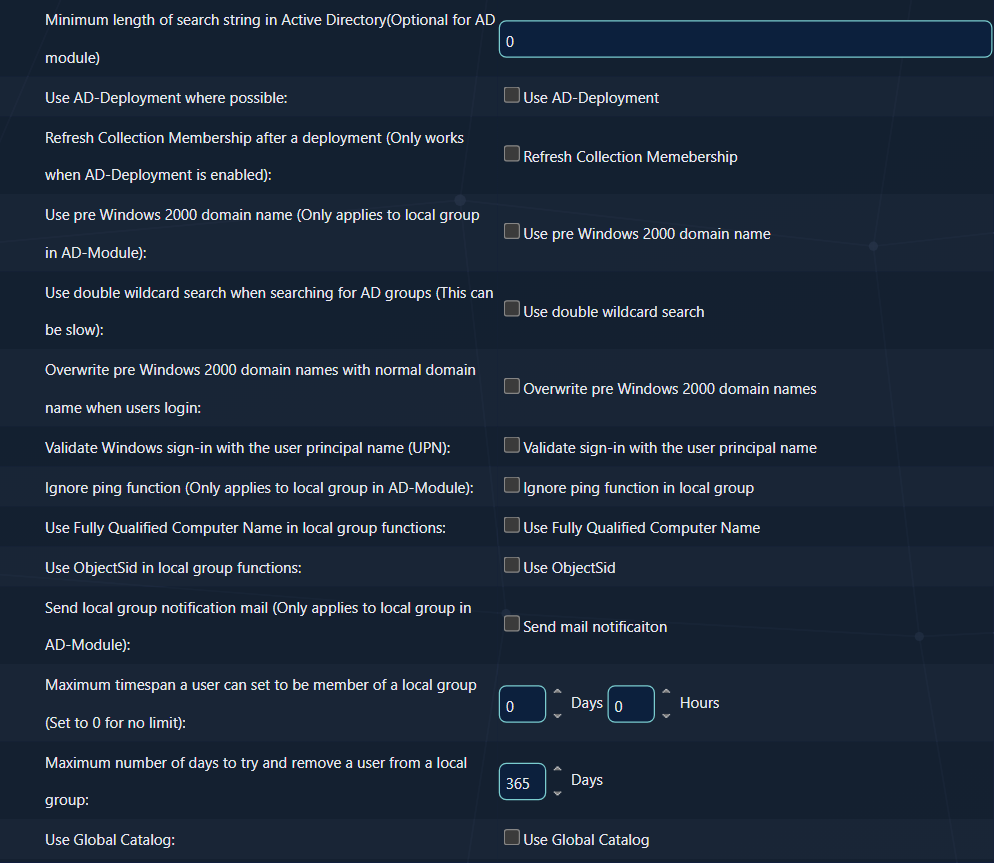
You may also tick Refresh Collection Membership to let SoftwareCentral refresh the collection membership after a resource has been added to an AD-Group. This will improve the deployment time, but put more stress on the SCCM server.
Refresh only works with AD-Deployment
The row Refresh Collection Membership after a deployment only works when Use AD-Deployment is ticked. Make many deployments in a row and it slows the collection evaluator, so leave it off in that case (see Best practice).
3 Requirements
SoftwareCentral handles AD-Deployment automatically. For this to work, the following must be in place:
| # | Requirement |
|---|---|
| 1 | Each application and package must be deployed to at least one collection with an install action. |
| 2 | To achieve uninstall functionality, applications and packages must also be deployed to a separate collection with an uninstall action. |
| 3 | Each collection must have a query rule which gets its members from an AD-Group. |
| 4 | AD-Groups in the query rule must contain the domain followed by a backslash and then the group name, for example CONTOSO\SWC-Install-App. |
| 5 | The SoftwareCentral service account must have permissions to add and remove users to and from AD-Groups in the Active Directory. |
No query rule
If there are no query rule on a collection that meets the requirements, a direct membership rule will be created instead.
4 How the groups are used
- If there are multiple query rules pointing to multiple AD-Groups, SoftwareCentral will add the target resource to all AD-Groups from the queries.
- If multiple query rules point to the same AD-Group, installing or uninstalling a program will cause the resource to be removed from the AD-Group, and thereby from the other install or uninstall collections that use that group.
- SoftwareCentral does not support AD-Deployment when importing computers, as new computers do not exist in Active Directory yet.
Shared AD-Groups
One AD-Group used by several install or uninstall collections links those collections. Use a separate AD-Group for each collection when you need them to act independently.
5 Best practice
- Set the query rules before you make the first deployment. While AD-Deployment is on, a collection with no query rule to an AD-Group gets a direct membership rule instead.
- Write each AD-Group as DOMAIN\group. SoftwareCentral splits the query rule at the backslash. A group name without a backslash is skipped without any message.
- Do not share one AD-Group between unrelated collections. Uninstalling one program removes the device from the group, and so from the other collections that use the group.
- Leave Refresh Collection Membership off for many deployments in a row. Each refresh adds load to the collection evaluator, so the deployments take longer to reach the devices.
- Give the service account the rights in Active Directory first. It must be able to add and remove members of every AD-Group that the query rules use. A missing right may not appear in the Log (see Troubleshooting).
6 Troubleshooting
| Symptom | Cause | What to do |
|---|---|---|
| Devices are not added to the AD-Group, and the Log shows nothing | SoftwareCentral skips the AD-Group when the query rule has no backslash or the group cannot be found in the domain. An error from Active Directory, such as missing rights, can be lost without a message: the caller catches it and does not report it. | Check the query rule against requirement 4 (DOMAIN\group), check that the group exists in that domain, and check that the service account can add members to the group. |
| The collection has a direct membership rule instead of a query rule | No query rule on the collection points to an AD-Group in the form DOMAIN\group. | Add the query rule with an AD-Group that meets requirements 3 and 4. |
| A device leaves another install or uninstall collection after an uninstall | Several collections use the same AD-Group (see section 4). | Give each collection its own AD-Group. |
| Refresh Collection Membership is not applied | The option only works when Use AD-Deployment is ticked. | Tick Use AD-Deployment first, then save. |
| Computers you import do not get AD-Deployment | New computers do not exist in Active Directory when they are imported. | Wait until the computer exists in Active Directory, then deploy it. |
See also: Active Directory Module Delegation of privilege · Deployment Manager configuration · Domain