1 Why the names are needed
The local group functions of the AD module use WMI and ADSI to add users to local groups on computers.
If your environment uses pre-Windows 2000 domain names, you must configure SoftwareCentral to use pre-Windows 2000 domain names as well.
2 Turn on the setting
The function is turned on in two steps. First, enable the functionality in the Settings menu, under Domain › Active Directory. Tick Use pre Windows 2000 domain name.
Once you have enabled this setting, click Save Settings and go to the next step.

3 Enter the names
The next step is to add all the pre-Windows 2000 domain names to the domains of SoftwareCentral. The domains are listed in the Settings menu, under Domain › Domains. Only members of the SoftwareCentral administrator role can change them.
Click Edit in the row of each domain, type its name in Pre Windows 2000 name, and click Save. The name is saved straight away, in capitals, and shows in the Pre Windows 2000 name column of the list.
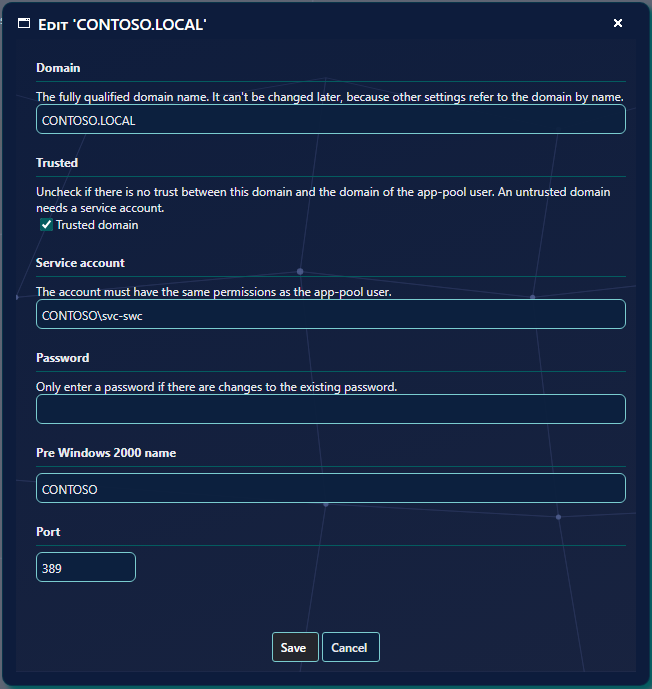
See The Domains tab for the other fields of the window.
4 What the names are used for
The names are used in three places. The first depends on the setting; the other two do not.
| Where | When | What SoftwareCentral does |
|---|---|---|
| Local group functions (AD module) | Only when Use pre Windows 2000 domain name is ticked. | When it adds or removes a user in a local group on a computer, it uses the pre-Windows 2000 name of the computer's domain and of the user's domain. If a domain has no name, it uses the name Windows reports for the domain instead, and writes a comment to the Log. |
| Reading the members of a local group | Only when Use pre Windows 2000 domain name is ticked. | It uses the same names when it works with the members of a local group on a computer. |
| Security roles with AD groups | Always, whatever the setting says. | When SoftwareCentral checks whether a user belongs to an AD group that is assigned to a security role, the pre-Windows 2000 name in the Domain table is also accepted. |
5 Best practice
- Enter the name for every domain that has members in local groups. Without a name, SoftwareCentral falls back to the name Windows reports, and the Log only notes that the name is missing.
- Enter the NetBIOS name, as Windows shows it, for example CONTOSO and not contoso.com. The name is the one SoftwareCentral reads from Active Directory when it falls back.
- Enter the names even if you leave the setting off. The security role check for AD groups uses the Domain table whatever the setting says.
- Save each name in its own window. A name is saved when you click Save in the Edit window, not with the page’s Save Settings button. The Use pre Windows 2000 domain name setting itself is still saved with Save Settings.
6 Troubleshooting
| Symptom | Cause | What to do |
|---|---|---|
| "Failed to add user '...' to local group '...' on computer '...', please try to enable pre Windows 2000 domain names." in the Log | Windows returned an unknown error while a user was added to a local group. The message suggests the pre-Windows 2000 names as the likely cause. | Tick Use pre Windows 2000 domain name and click Save Settings, then enter the names with Edit on Domain › Domains. |
| "Failed to get members of the local group '...' on computer '...' please try to enable pre Windows 2000 domain names." in the Log | Windows returned an unknown error while the members of a local group were read. | Same as above. |
| "PreWindows2000DomainName is missing for computer domain '...'" or "PreWindows2000DomainName is missing for user domain '...'" in the Log | The setting is ticked, but the Domain table has no pre-Windows 2000 name for that domain. | Click Edit in the domain’s row on Domain › Domains, enter the name, and click Save. |
| "Failed to find the name of domain '...'" in the Log | SoftwareCentral could not read the domain's name from Active Directory. | Check with Edit on Domain › Domains that the service account of the domain is correct, and that a domain controller for the domain can be reached. |