SoftwareCentral · Web services

ServiceNow

Call a SoftwareCentral web service from ServiceNow, with the Clone Computer web service as the example.

SOAP or REST HTTPS and Basic Authentication Clone Computer

1 Before you start

The SoftwareCentral web services can be called from ServiceNow with SOAP or REST.

A theoretical example This is only an example. Consult the ServiceNow manual for how to integrate an external web service.

To call a web service in SoftwareCentral from ServiceNow, you need a site that can be called from the web. In this example we have set up an HTTPS site that uses Basic Authentication. See Configure Anonymous or Basic Authentication.

2 Set up the endpoint

Here we configure a web service in ServiceNow that clones a computer. The endpoint is the web service, with the publicly available address. We turn on Use basic authentication and use an Active Directory account we have named SWC_ServiceNowAccount. The account is a member of a security role with access to the web service and to some computers.

A ServiceNow REST message named SoftwareCentral - Clone Computer with the endpoint and basic authentication
The REST message in ServiceNow.

3 Add the parameters

Our Devices - Clone Computer web service has these parameters:
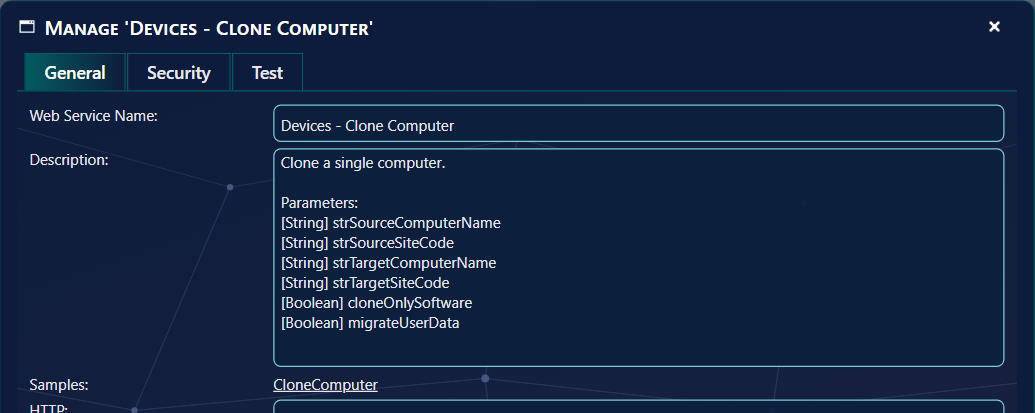
The Manage window of Devices - Clone Computer with the six parameters in the description
The parameters of Devices - Clone Computer, in its Manage window.

We then add the parameters in ServiceNow, as the query parameters of the HTTP method, and as variable substitutions:

The ServiceNow HTTP method with the six query parameters and test values
The HTTP method with its query parameters.
The ServiceNow variable substitutions list with the six parameter names
The variable substitutions.

4 Test it and use it in a script

We can now test the web service from ServiceNow with our test values:

The Related Links with Preview Script Usage and Test
Test in the related links.
A test run with HTTP status 200 and a response saying the clone started
The test run: status 200 and the response from SoftwareCentral.

And view an example of how to use it in a ServiceNow script with Preview Script Usage:

The Preview REST Message script usage window with the script
The script that ServiceNow generates.