1 Where to send it
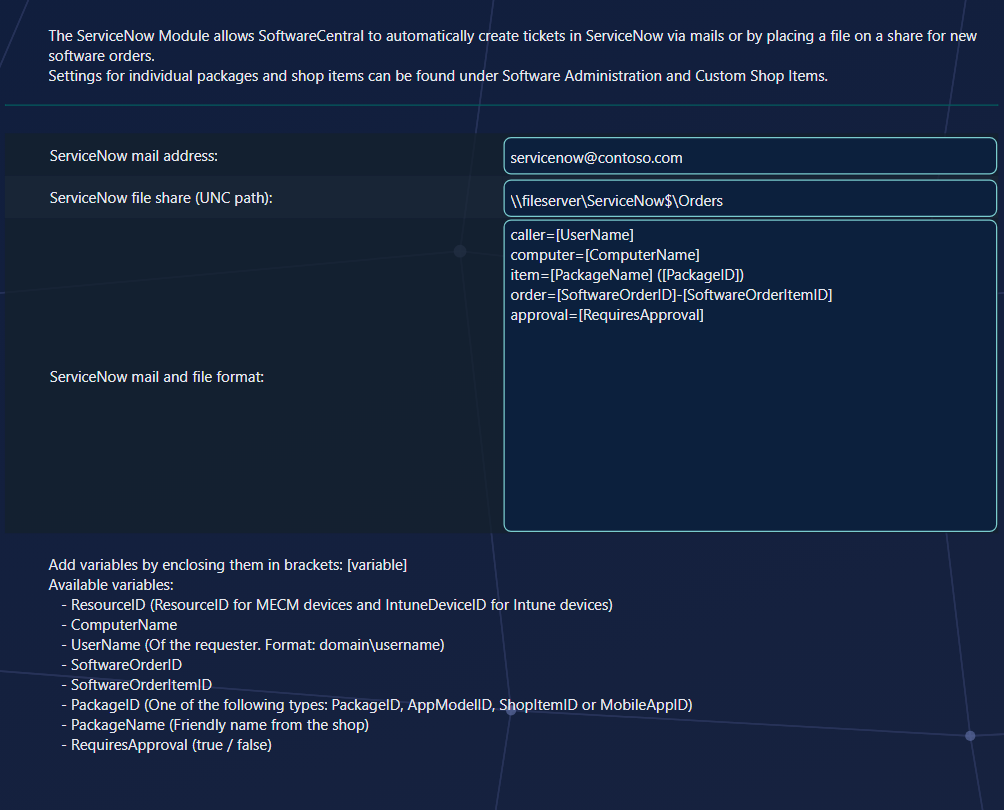
Fill in one of the two, or both, and click Save Settings:
| Setting | What SoftwareCentral does |
|---|---|
| ServiceNow mail address | Sends one plain-text mail per ordered item to this address, with the subject SoftwareCentral Order. Point it at the inbound mail address ServiceNow reads. |
| ServiceNow file share (UNC path) | Writes one text file per ordered item to this share, named after the item ID, for example 177770.txt. The account the SoftwareCentral website runs as needs write access to the share. |
2 The format
ServiceNow mail and file format is the text of the mail and the file. Write it in whatever form your ServiceNow import expects, and put variables in square brackets. Each variable is replaced with the value from the order; upper and lower case do not matter.
| Variable | Replaced with |
|---|---|
[ResourceID] | The device's resource ID in Configuration Manager, or its Intune device ID. |
[ComputerName] | The device the item was ordered for. |
[UserName] | The person who ordered, as domain\username. |
[SoftwareOrderID] | The order ID, shared by all items ordered together. |
[SoftwareOrderItemID] | The item ID, unique per ordered item. |
[PackageID] | The package ID, application ID, custom shop item ID or Intune app ID. |
[PackageName] | The name shown in the shop. |
[RequiresApproval] | true or false. |
For example:
caller=[UserName]
computer=[ComputerName]
item=[PackageName] ([PackageID])
order=[SoftwareOrderID]-[SoftwareOrderItemID]
approval=[RequiresApproval]
3 Choose the items
Nothing is sent until you choose which items create a ticket. Once a mail address or share is saved, a ServiceNow column appears in Software Administration and Custom Shop Items. Switch it on for each item, or tick Create a ticket in ServiceNow when this item is ordered in the item's own window.
In Software Administration, the column and the tick box are only shown to security roles that have access to the ServiceNow tickets menu. If you cannot see them, check the role in Security Roles.
4 When a ticket is made
- At the moment the order is placed, in the new shop and the classic shop alike.
- Once per ordered item: an order with three items gives three mails or files.
- Also for items that need an approval, before anyone has approved. Use
[RequiresApproval]if ServiceNow should treat them differently. - Not for removals: uninstalling a program does not create a ticket.
5 Best practice
- Use
[RequiresApproval]to tell approval items apart. It is replaced withtrueorfalsein both the mail and the file. - Tick only the items that should create a ticket. Nothing is sent for an item whose box is not ticked.
- Expect one file per item. Each file is named after the item ID, so the items of one order never overwrite each other.
- Use one channel unless ServiceNow needs both. If a mail address and a file share are both filled in, each ordered item is sent both ways.
6 Troubleshooting
| Symptom | Cause | What to do |
|---|---|---|
| There is no ServiceNow column in Software Administration or Custom Shop Items, and no tick box. | Neither a mail address nor a file share is saved, or the signed-in security role has no access to the ServiceNow tickets menu. | Save a mail address or a file share under Settings › Extra Modules › ServiceNow, with Save Settings. If the column is still hidden, check the role in Security Roles. |
| “Failed to create ServiceNow ticket for software order item with id 'item ID'.” in the log. | Writing the file or sending the mail failed. The error is in the same log entry. The order is not stopped, and the ticket is not sent again automatically. | Read the error in the log entry. For a file share, check the path and that the account the SoftwareCentral website runs as can write to it. For a mail address, check the address. |
| An ordered item created no mail or file. | The Create a ticket in ServiceNow when this item is ordered box is not ticked for that item. Nothing is sent for it. | Tick the box in the item's window, then order the item again. |
| Uninstalling a program creates no mail or file. | Tickets are only created when a program is ordered for install. | Nothing to do. This is how it works. |
A file that was written is logged as Successfully created file.
For the other direction, ServiceNow calling SoftwareCentral, see the web services topic ServiceNow.